

What the site tools show you before you commit
Most property owners evaluate a fast-charging opportunity with one number in hand: whatever a lease offer or a contractor's quote says. That number answers a narrow question, what one counterparty is willing to pay or charge, and answers it after the counterparty has already done its own analysis and priced the offer in its own favor. A site-intelligence tool exists to answer a different, prior question, what the parcel itself is worth as an energized asset, before anyone else's math enters the room.
Three outputs, not one
Run an address through a proper site screen and it does not return a single verdict. It returns three separate outputs, each doing a different job:
- An opportunity rating. A composite score built from traffic, access, grid proximity and competitive density, the same categories a network's own real-estate team would weigh. It tells you whether the parcel clears the bar worth pursuing at all, before you spend time on anything downstream.
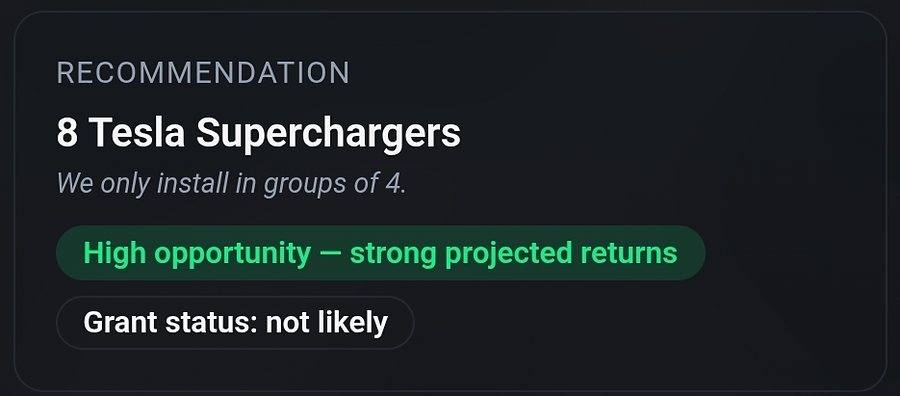
- A configuration recommendation. Not just whether to build, but what, stall count, charger class and how those stalls should be grouped for the power distribution a site of that size actually supports. Equipment does not scale continuously, it scales in the increments a cabinet and a transformer actually come in, and a recommendation that ignores those increments is not a recommendation, it is a guess.
- A revenue range. A modeled band, not a promise, built from the traffic and market inputs the screen already collected. The width of the band matters as much as the number in the middle: a tight range says the inputs are well understood, a wide one says the site's economics still depend on assumptions worth testing before capital moves.
Why the configuration step is the one people skip
It is tempting to treat the opportunity rating as the whole answer and stop there, a favorable score feels like permission. But two sites with identical scores can need entirely different builds. A parcel with abundant grid headroom and a corridor full of through-traffic can support a fast-charging cluster sized to intercept drivers who are not stopping for anything else. A parcel next to a grocery anchor with the same score might return more by pairing fewer, slower stalls with the dwell time already happening there. The rating tells you the parcel is worth developing. The configuration tells you what "developing" should actually mean on that specific piece of ground, and getting it wrong is expensive precisely because equipment, once specified and installed, is not something you resize next year.
Reading a range without over-trusting it
A modeled revenue range is only as good as what fed it, and the honest way to use one is to interrogate the inputs before you believe the output. Traffic counts age; a corridor that carried steady volume two years ago may have a new signal, a new competitor, or a shifted commute pattern since. Grid proximity on a map is not the same as confirmed capacity, a utility's published headroom can change between the screen and the interconnection application. None of that makes the range useless, it makes it a starting hypothesis, the same one an internal real-estate team would build for itself, not a substitute for the site-specific verification, that comes next.
What the tool cannot do for you
A screen compresses public and semi-public signals into a comparable number. It cannot see a utility's actual interconnection queue, negotiate the terms of any agreement, or tell you what a specific counterparty will offer, those still require a conversation, an application, or a professional review. What it does is remove the asymmetry that makes the first conversation risky: instead of hearing an offer and wondering whether it is fair, you walk in already knowing roughly what the parcel supports and what it should be worth, and you can weigh anything you are told against a number nobody handed you.
Run your own screen first
Enter an address and see the opportunity rating, configuration recommendation and modeled revenue range for your parcel, before you take a call from anyone else.
Run a Site Scan